Apollo MCP Integration: How to Connect Apollo.io to an Agentic Demand Engine
A sales rep opens Apollo, searches for target accounts, exports a list, checks firmographic details in another tab, reviews a few LinkedIn profiles, and finally starts drafting outreach. None of that is selling. All of it happens before a single prospect has been contacted.
Apollo MCP integration can reduce those manual handoffs. An AI client connected through MCP (Model Context Protocol) can search Apollo, retrieve company and contact data, request enrichment, create or update records, and work with outreach sequences from the same interface where the next step is planned or drafted.
The connector does not make every match accurate or every message ready to send. The workflow still needs defined filters, credit controls, approval gates, and human judgment. What changes is that research and execution can take place inside one governed sequence instead of across disconnected tabs and spreadsheets.
One quick distinction: this article covers Apollo.io, the B2B sales intelligence and prospecting platform. Apollo GraphQL offers a separate MCP server for software development. If you are looking for GTM, audience validation, enrichment, or outbound workflows, Apollo.io is the relevant product.
What Apollo MCP Can Actually Do
Apollo.io combines a B2B database with prospecting, enrichment, contact management, sequencing, and sales analytics. Teams can use it manually to find people and companies by criteria such as job title, seniority, location, industry, and company size.
Apollo MCP brings supported Apollo actions into compatible AI clients such as Claude, ChatGPT, Perplexity, Cursor, and Codex. According to the official Apollo MCP documentation, the connector can help users:
- Find people and companies using natural language.
- Enrich people or companies with data available under the connected plan.
- Create and update contacts and accounts.
- Draft and send one-off emails.
- Create sequences, improve steps, and generate variants.
- Add contacts to an existing sequence.
- Create and manage tasks.
- Analyze team performance.
Every action remains subject to the connected user's Apollo permissions, plan limits, API rate limits, and credit balance. MCP provides access to Apollo's tools. The AI client and the workflow determine when those tools are called, which calls require approval, and what must be reviewed by a person.

Before Connecting: Privacy, Permissions, and Credits
Apollo MCP uses OAuth, so the user signs in to Apollo without copying an API key into the AI client. Before authorizing the connection, a few controls need attention.
Turn off model training
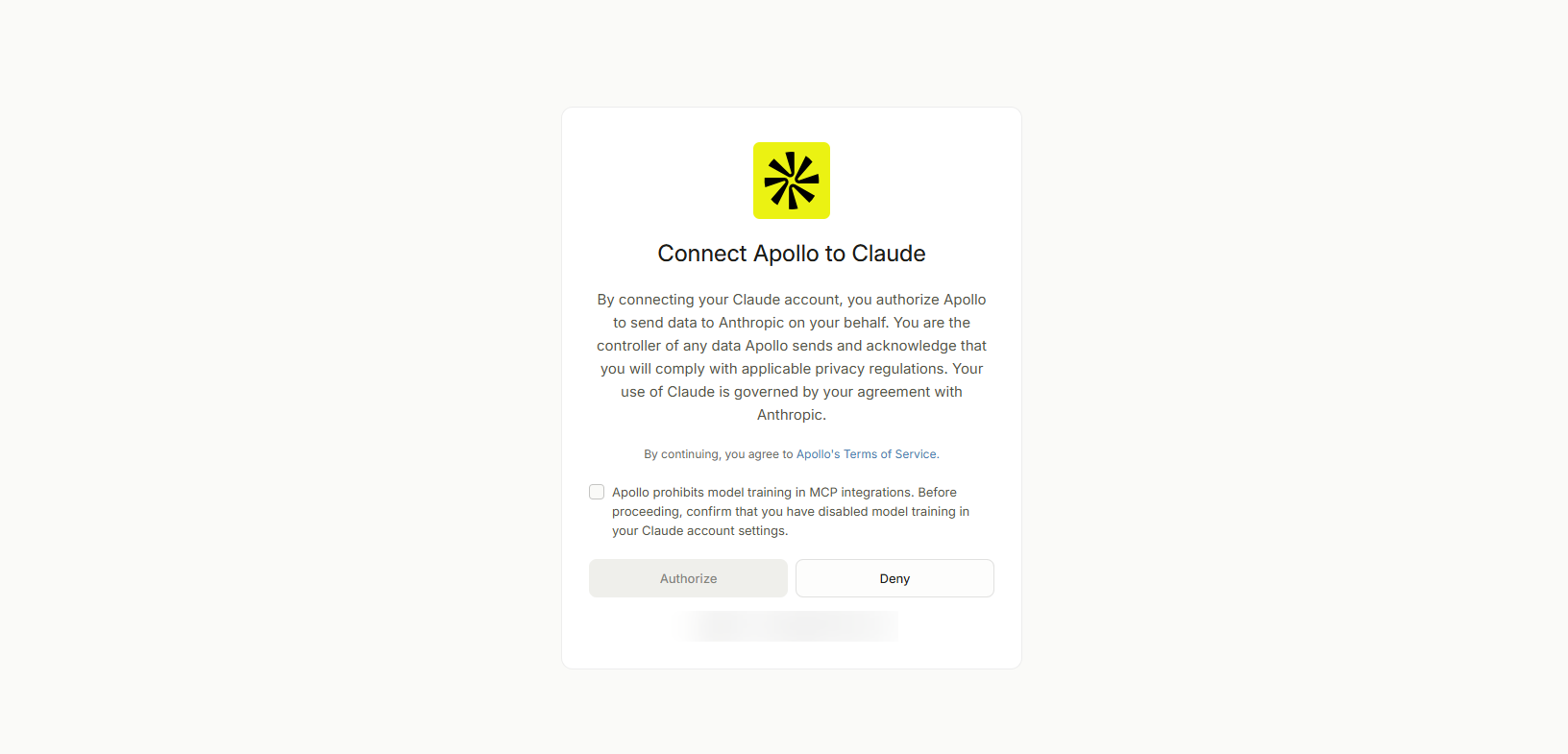
Apollo prohibits model training with Apollo MCP integrations. Confirm that model training is disabled in the AI account or client settings before starting the authorization flow.
Use the correct Apollo account
Apollo MCP requires a work email address; personal addresses such as Gmail or Yahoo are not supported. The integration is user-specific, so each person connects their own account rather than sharing a login. If a dedicated service account is used instead, it should have a named owner and narrowly defined access, permitted by company policy and Apollo's terms.
Review actions individually
In Claude, each Apollo action can be set to Always allow (Claude performs it without asking) or Approval required (Claude confirms first). A cautious starting configuration:
- Search people and companies: always allow, if the action doesn't consume credits
- Read contacts, accounts, sequences: always allow
- Enrich people or companies: approval required
- Create or update Apollo records: approval required
- Add contacts to a sequence: approval required
- Draft an email: always allow
- Send an email or activate outreach: approval required
Credit behavior varies by action and plan, so check Apollo's current credit documentation rather than assuming every lookup is free.
Define the human gates
Tool permission and editorial approval are different controls. Allowing the model to draft an email doesn't mean the message should be sent. Before anything moves forward, a person should confirm the account and contact match the intended Buyer Profile, the Apollo data is complete and current, the message uses a supportable angle, the prospect belongs in the selected sequence, and the outreach complies with company policy and applicable privacy rules.

How to Connect Apollo MCP to Claude
Apollo provides a native connector inside Claude. No API key or local server installation is required for the standard setup.
Step 1: Open the connector directory
In Claude, select Connect your tools to Claude from a conversation, or open Customize, then Connectors.
Step 2: Add Apollo.io
Search for Apollo.io and add the official connector, taking care to select it rather than the unrelated Apollo GraphQL integration.
Step 3: Authorize your account
Review the terms and complete the OAuth flow with your Apollo work email. The connection uses that Apollo user's permissions and limits.
Step 4: Configure action permissions
Return to Customize, then Connectors, and select Configure beside Apollo.io. Require approval for enrichment, record changes, sequence enrollment, sending, and other consequential or credit-consuming actions until the workflow is validated.
Step 5: Run a retrieval-only test
Start with a task that doesn't enrich, create, update, or contact anyone:
"Search Apollo for ten VPs or Heads of Marketing at US-based B2B infrastructure software companies with 200 to 1,000 employees. Return name, title, company, company size, location, and LinkedIn URL. Do not enrich records, create contacts, add anyone to a sequence, or send outreach."
Review whether the results match the requested profile before moving to any action that consumes credits or changes data. If Apollo isn't listed natively in the chosen MCP client, technical users can connect the official remote server at https://mcp.apollo.io/mcp using Streamable HTTP and OAuth 2.0.
Workflow: Search, Enrich, and Draft Outreach
A safe outbound workflow separates discovery from consequential actions. The first run generates a reviewable candidate list; only approved candidates move to enrichment and drafting.
Stage 1: Build and review the candidate list
"Search Apollo for marketing leaders at US-based B2B infrastructure companies with 200 to 1,000 employees. Prioritize VP Marketing, Head of Demand Generation, and VP Growth titles. Return ten candidates with name, title, company, company size, industry, location, and LinkedIn URL. Explain briefly why each candidate matches the requested profile. Do not enrich, create records, add contacts to a sequence, or send messages."
The rep reviews the list and removes poor matches, subsidiaries that don't fit, duplicates, or titles that look relevant but don't own the intended problem.
Stage 2: Enrich only approved candidates
"Enrich the five approved candidates with the work email and phone data available under our Apollo plan. Ask for approval before any credit-consuming action. Do not create contacts, add anyone to a sequence, or send outreach."
Stage 3: Draft without sending
"Draft one concise outreach angle for each approved candidate using only the Apollo data retrieved in this workflow and the product messaging I provide. Separate verified Apollo data from any inference. If there isn't enough evidence for meaningful personalization, state that instead of inventing a trigger. Do not send messages or enroll contacts in a sequence."
The model applies the same search, enrichment, and drafting steps across the list without human fatigue, though that doesn't guarantee equal quality. Some records will contain better data than others, and every candidate and outreach angle still needs review. Apollo data is also only one part of the research; recent company news, first-party engagement, website content, and CRM history may require separate sources, and the workflow should keep clear which conclusions came from Apollo and which were generated or imported from elsewhere.
What Happens Behind the Scenes
- Apollo: Provides the B2B data, records, enrichment, sequences, and supported GTM actions.
- Apollo MCP: Exposes supported Apollo tools to the AI client.
- AI client: Presents the tools and enforces configured action approvals.
- Workflow instructions: Define filters, action order, stopping points, and evidence requirements.
- Language model: Interprets results and drafts the requested output.
- Sales or marketing reviewer: Confirms fit, approves credit use, reviews the message, and authorizes execution.
This separation makes the workflow auditable. A poor candidate list points to weak filters or incomplete Apollo data. An unsupported message angle points to a drafting or evidence problem. An unintended enrollment means tool permissions or approval gates were too broad.
What Changes When Apollo Is Agent-Connected
The manual Apollo workflow isn't inherently broken. Its constraint is how much consistent research and data movement a person can complete before other priorities take over. An agent-connected workflow changes three things: defined research steps run consistently across a list instead of tapering off toward the bottom, fewer manual handoffs are required since search, enrichment, and drafting happen in one controlled task, and review replaces some repetitive execution so reps spend more time judging fit and message quality rather than gathering the inputs.
Salesforce's 2026 State of Sales report found that sellers expect AI agents to reduce prospect research time by 34% and email drafting time by 36%. The same research reports that sales reps spend roughly 70% of their time on non-selling work. These are expectations and reported time allocation, not guaranteed savings from Apollo MCP specifically, but they illustrate the capacity problem that connected prospecting workflows address.
Workflow: Validate a Buyer Profile for a Demand Engine
Apollo is useful beyond one-to-one outbound. Inside Hiper's Demand Engine, Apollo and ZoomInfo help ground the Buyer Profile in market evidence before it's applied to a demand plan. The workflow begins with a hypothesis: a defined set of companies, industries, employee ranges, job functions, titles, seniorities, and locations. Apollo can then help test whether those companies and buyers exist in meaningful numbers.
"Use Apollo to test this proposed Buyer Profile: US-based B2B infrastructure software companies with 200 to 1,000 employees, targeting VP Marketing, Head of Demand Generation, and VP Growth roles. Return the number and distribution of matching companies and people available through the search, identify title variations we may have missed, and flag filters that appear too narrow or too broad. Do not enrich contacts, create records, or start outreach."
Apollo provides evidence about the titles, companies, and profiles present in its data. It doesn't independently prove the audience can be reached efficiently in every advertising channel. Hiper's Marketability process continues by pulling live audience sizes from the channels themselves and testing the profile against reach, targeting applicability, and cost before budget is deployed. Apollo and ZoomInfo ground the Buyer Profile in truth; live channel reads test audience size and targeting applicability; the Integrated Demand Plan connects the Buyer Profile to Marketing Offers and funnel progression. Human and client approvals remain in place before plans, ads, or budgets move forward.
How Apollo Fits Into Hiper's Demand Engine
Hiper does not treat Apollo as an isolated list-building tool. A Demand Engine carries Marketing Offers through ingestion, messaging, creative, targeting, deployment, and measurement. Apollo can support the plan-and-target stage by testing assumptions about the buyer universe before spend begins.
That is where MCP becomes more than a convenience. It allows an AI interface to query live, structured systems as part of a defined workflow, the same logic behind how MCP turns a fragmented toolset into an agentic demand engine. The engine supplies the record lifecycle, decision rules, and approval gates. Apollo supplies one source of market evidence. Channel connections supply live reach. Senior marketers and clients apply judgment where quality, strategy, and budget are at stake.
The result is not unattended prospecting or automated demand at any cost. It is a more connected operating model in which machines handle research and data movement while people make the calls that require context and accountability.
Getting Started
Start with one retrieval-only search and a small target set. Confirm the results match the intended profile, then test enrichment with approval required and a known credit limit. Draft messages without sending them, and check whether every claim is supported by the retrieved data. Only expand permissions after the team has observed the workflow, documented the approval points, and assigned ownership for data quality, credit use, record changes, and outreach. Sending or sequence enrollment should stay approval-gated unless the organization has deliberately approved a more automated operating model.
This pattern, a permissioned connection inside a defined workflow, runs through how MCP turns a fragmented toolset into an agentic demand engine. Apollo makes the pattern easy to see because research, enrichment, and action are separate tool calls whose costs and consequences can be reviewed.
Frequently Asked Questions
What is Apollo MCP?
Apollo MCP is Apollo.io's official Model Context Protocol server. It connects Apollo accounts to compatible AI clients so users can search, enrich, manage records, work with sequences, and perform other supported GTM actions through structured tool calls.
Is Apollo MCP the same as Apollo GraphQL's MCP server?
No. Apollo.io's MCP server is built for sales intelligence and GTM workflows. Apollo GraphQL's MCP server is a separate developer product for GraphQL-based applications.
Which AI clients support Apollo MCP?
Apollo provides native or documented connections for tools including Claude, ChatGPT, Perplexity, Cursor, and Codex. Other compatible clients can connect to Apollo's remote MCP server using Streamable HTTP and OAuth 2.0.
What Apollo plan do I need?
Apollo states that any plan can use Apollo MCP, including the free plan. The data, features, rate limits, and actions available through the connector still depend on the connected Apollo account.
Does Apollo MCP use my existing credits?
Yes. Credit-consuming actions draw from the connected Apollo account's existing balance. Credit requirements vary by action and plan, so review current usage information before approving enrichment or running a workflow at scale.
Can the agent send outreach without approval?
Only if the connected account has permission and the AI client is configured to allow it. Most teams should require approval for sending, sequence enrollment, record changes, and credit-consuming actions while establishing the workflow.
Does Apollo MCP require a work email?
Yes. Personal email providers such as Gmail and Yahoo are not supported for MCP authorization.
Do I need to disable model training?
Yes. Apollo prohibits model training with Apollo MCP integrations and requires users to turn it off in the connected AI account or client before authorizing the integration.
Do I need a developer to connect Apollo MCP?
No. The native connectors use OAuth and require no API key or local installation. A technical setup is only necessary when connecting the standalone remote MCP server to a client without a native Apollo integration.
Does Apollo MCP guarantee accurate contacts or personalized outreach?
No. The connector provides access to Apollo's available data and actions. Records may be incomplete or outdated, and generated outreach may contain weak or unsupported inferences, so human review remains necessary before contacts are enrolled or messages are sent.

